Kids Academy: Learning Games
- 3.8
- Rating
- 1.00M
- Installs
- Free
- Price
 Analysis by App-foxy
When I test an educational app on a shared family device, I look beyond whether the activities are colorful. I want to know whether a child can start using it without constant adult intervention, whether two children of different ages can use it sensibly, and whether the app fits into an ordinary household routine. Kids Academy: Learning Games is designed for that kind of short, guided learning session. It is a free education app from Bimi Boo Kids Learning Games for Toddlers FZ-LLC, aimed at Everyone, with activities built around early vocabulary, mathematics, and other learning topics.
My first impression is that it works best as a collection of small learning moments rather than as a complete teaching program. A child can open it for a quick activity while a parent prepares dinner, or an adult can sit nearby and use the videos and games as a starting point for conversation. That distinction matters. I would recommend it to families looking for an approachable supplement to preschool learning, but I would not treat it as a replacement for books, real-world play, or a structured classroom.
How it fits a shared family device
On a household tablet, the biggest advantage is flexibility. One child might be interested in basic counting, while another wants vocabulary practice. Because the app brings several early-learning areas together, it can be more convenient than switching between separate single-purpose downloads. That makes it useful when the device is passed between siblings or when a parent wants one familiar place for a short activity.
You May Also Like

 Blood Strike: 2.5 Anniversary
Blood Strike’s Loadouts Turn Every Drop Into a Tactical Gamble
A close look at Blood Strike’s custom loadouts: how fast access to signature weapons reshapes its battle royale rhythm, rewards preparation, and narrows the gap between fights.

 Pandora - Music & Podcasts
Pandora’s Music Is Easy to Start, but Harder to Recover
Pandora’s strength is its low-effort path from a seed to a station. Its weak spot is how much confidence it asks you to place in connection, setup, and quiet recovery.

 8 Ball Pool
 Is Built on Rivalries, Rematches, and Routine
A close look at the rivalries, rematches, shared routines, and unanswered safety questions that turn a quick pool match into a persistent mobile community.

 Samsung Music
’s Quiet Strength Is Playing What You Already Own
Its reach comes less from spectacle than from dependable access to a personal library. That simplicity is both the app’s strongest retention engine and its ceiling.

 AccuWeather: Weather Radar
AccuWeather Review: A Quick, Clear Forecast for Everyday Decisions
For everyday plans, the best forecast is the one you can understand quickly. AccuWeather makes rain timing, radar, and local conditions easy to act on, with a few trade-offs.

 Hill Climb Racing
Why Hill Climb Racing Still Turns Crashes Into One More Run
A tiny car, a bumpy hill and one more upgrade: Hill Climb Racing keeps resurfacing because its simple chaos makes every near-miss feel personal.
More From Our News Desk



A realistic use case is a child using the tablet for ten or fifteen minutes before leaving for preschool. I would choose one topic in advance, let the child complete a small activity, and then put the device away rather than allowing the session to drift into unplanned screen time. The app is easier to manage when it has a clear purpose: naming objects, recognizing simple ideas, or practicing early number concepts. It is less effective when handed over as an open-ended distraction.
The shared-device angle also changes how I judge the design. A toddler may tap randomly and enjoy the response, while an older preschooler may expect a clearer challenge. Parents should watch the first few sessions to see whether the child understands what to do or is simply repeating taps until something happens. That observation tells you more than the bright presentation does, especially when children in the same home have different language abilities or attention spans.
One practical tip is to keep the device physically close during the first use, even if the child eventually uses the app independently. This lets an adult notice which activities are genuinely educational and which ones the child finds confusing. It also creates an opportunity to turn a screen prompt into an offline question: after a vocabulary activity, ask the child to find a similar object in the room; after a counting task, count toys or fruit together.
Setting expectations before a child starts
The app is free to install, which makes trying it straightforward, but it includes in-app purchases ranging from $8.99 to $59.99 per item. In a family setting, that is an important boundary to establish before handing over the device. I would handle any purchase decisions myself and make it clear that the child is using the learning activities, not choosing upgrades or paid content.
This is not a criticism unique to educational apps, but it is especially relevant here because the intended user may be too young to understand the difference between a learning choice and a purchase screen. A parent should explore the available experience first, decide whether the free portion is enough, and keep the device’s purchasing controls under adult supervision. The app can be useful without turning every session into a sales discussion, but that depends on how the household manages access.
I also recommend deciding when and where the app may be used. A shared tablet often serves several purposes, so a simple routine helps: learning activities at the kitchen table, no use during meals, and the device returned to its usual charging place afterward. These rules are not supplied by the app itself; they are household habits that prevent an educational tool from becoming a source of arguments between siblings.
Another useful boundary is to choose the activity before the child begins. Rather than saying “play the app,” I would say “let’s do a vocabulary activity” or “you can try one math game.” That small change gives the session a learning goal and makes it easier to stop. It also helps an adult notice whether the child is ready for a particular topic instead of assuming every activity is equally suitable.
Coordinating learning between siblings and adults
Families often need coordination more than they need another collection of games. If two children share one device, decide whose turn comes first and how long each session lasts. I would avoid comparing their progress directly, because a younger child may be exploring basic recognition while an older one is ready for more demanding tasks. The app is more helpful when each child has an individual goal, even if both use the same installation.
For a younger child, an adult can sit beside the device and repeat words or count aloud. For an older preschooler, the adult might let the child attempt the activity alone and then ask what was learned. This creates two different ways to use the same content without pretending that the app automatically adapts perfectly to every child. The parent remains the person who decides whether the level is appropriate.
I found that short turn-taking works better than allowing one child to keep the device until boredom or frustration ends the session. A timer is not essential, but a visible routine is useful: one activity for one child, then a changeover. If a child is in the middle of a task, let that task finish where possible, but avoid extending the session simply because the next screen is attractive. The goal is steady practice, not maximum time inside the app.
There is also a coordination benefit in using the app as a shared conversation starter. A child can watch or complete an activity, then explain it to a parent or sibling. That is particularly valuable for vocabulary because understanding a word in an app is not the same as using it naturally. Asking the child to describe an object, point to one nearby, or use the word in a sentence turns passive recognition into a more meaningful exercise.
One trade-off is that a single app cannot know the family’s learning plan. If a child is already practicing a particular letter, number concept, or set of words at preschool, an adult may need to choose activities that complement that work. I would not expect the app alone to track a child’s broader development or coordinate lessons across children. Its strength is convenience; the adult supplies continuity.
Age suitability and the question of trust
The Everyone content rating makes the app broadly approachable from a content perspective, but that should not be confused with identical suitability for every age. A toddler may need help understanding the instructions, while a preschooler with stronger reading or number skills may find some activities too simple. The age label is a useful starting point, not a substitute for watching how a particular child responds.
In my experience, trust with a children’s learning app comes from active supervision rather than from assuming that an educational label solves everything. I would check the app myself, observe how the child moves through it, and decide whether the pace and difficulty feel comfortable. If the child becomes frustrated, starts tapping without thinking, or asks for the device constantly, I would shorten the session or switch to an offline activity.
The developer, Bimi Boo Kids Learning Games for Toddlers FZ-LLC, positions this product within its family of early-learning experiences. The app was released on March 22, 2020, and its current version is 1.1.43, with Android support from version 7.0 onward. Those details make it accessible to many older devices, which can be useful when a family has a shared tablet that is no longer new. Still, compatibility does not tell you whether the experience will suit your child’s exact developmental stage.
I would also be careful about using the app with a child who needs a very specific educational approach. Some children benefit from tactile materials, handwriting practice, physical manipulatives, or a teacher’s immediate correction. A screen-based activity may reinforce recognition, but it cannot fully replace the sensory and social parts of early learning. For those children, this app is better as a small supporting activity than as the center of the routine.
Parents may reasonably wonder whether the app is trustworthy enough to leave with a child. My answer is conditional: it is suitable for supervised, purposeful use, but I would not treat any children’s app as something to ignore completely. Keep the first sessions supervised, understand which parts are available without payment, and make sure the child knows when the device must be handed back. Those steps protect both the learning experience and the household routine.
What the learning mix does well
The combination of vocabulary, math, videos, and games gives the app a useful breadth. Instead of practicing one narrow skill every time, a child can move between language and number activities depending on interest or daily needs. That variety helps when attention is short. If a child has lost patience with counting, a vocabulary activity may provide a gentler change without leaving the educational setting altogether.
The video-and-game combination is also worth using deliberately. Videos can introduce or reinforce an idea, while interactive activities give the child a chance to respond. I would not assume that watching is enough. After a video, pause and ask the child to demonstrate the idea away from the screen. This simple sequence—watch, try, explain—makes the app more valuable than letting the child consume one clip after another.
Its strongest role is repetition without making every practice session feel like a worksheet. Young children often need to encounter the same idea several times, and a game-like format can make repetition easier to accept. The limitation is that entertainment can become the child’s main focus. If the child remembers the animation but cannot answer a related question without the app, follow up with a real-world example.
Compared with ordinary flashcards, the app offers more movement and audiovisual stimulation. Compared with books, it can respond to taps and make practice feel more immediate. Compared with a preschool curriculum, however, it is less connected to a teacher’s sequence and less capable of responding to individual misunderstandings. I would choose it for variety and convenience, not for a complete educational pathway.
Where it may frustrate families
The average rating is 3.8 from around 1.7 thousand ratings, and the app has more than a million installs. Those figures suggest that it has reached a substantial audience while also leaving room for mixed experiences. I would read that combination as a reason to try it with realistic expectations: it is established enough to be worth exploring, but not something every family will find equally polished or equally engaging.
The main friction is likely to come from fit. A child who wants fast challenge may outgrow the simpler activities, while a child who needs very clear spoken guidance may require an adult nearby. The broad educational range is convenient, but breadth can mean that no single topic feels as deep as it would in a dedicated math or language app. Families should decide whether they value having several subjects together more than having one highly focused tool.
Paid content is another consideration. The free starting point lowers the barrier to testing the app, but the in-app purchase range means the eventual cost can vary considerably depending on what a household chooses. I would never buy simply because a child asks during a session. Try the available material first, see whether it fits your routine, and only then consider whether additional content is justified for your family.
I would skip this app if you are looking for detailed progress reporting, a formal curriculum, or a tool that independently manages several children’s learning paths. I would also look elsewhere if your priority is completely screen-free learning or if your child responds poorly to game-like rewards and animated presentation. In those situations, physical books, teacher-led resources, or hands-on counting and language activities may be a better match.
My household verdict
After considering the app as a family tool rather than just a children’s download, I see a clear place for it. Kids Academy: Learning Games works well as a short, supervised supplement for early vocabulary and math practice, especially when a household wants several learning topics in one app. Its free entry point, Everyone rating, and support for older Android devices make it easy to test on a shared tablet.
The best results come from adult coordination. Set the purchasing boundary before the child starts, choose a specific activity, give siblings predictable turns, and connect what appears on the screen with objects, words, and counting in the real world. Those steps turn a casual game session into a more useful learning routine. They also answer the practical questions parents usually have about shared use: who controls access, how long a child should use it, and how to keep the experience from becoming a source of conflict.
I would recommend it to parents of toddlers and preschool-age children who want an approachable way to add variety to home learning. I would not recommend relying on it alone, and I would be cautious about paying for more content until the free experience has proved useful for your particular child. The most important trade-off is convenience versus depth: you get a broad set of activities in one place, but an adult still needs to provide judgment, context, and follow-up.
For my own household recommendation, I would install it, test it alongside the child, and keep it as an occasional learning station rather than an always-available babysitter. That approach respects the app’s strengths without asking it to do what it was never meant to do. If your family wants compact practice in vocabulary and early math, it is worth a try; if you need individualized teaching, detailed coordination, or a fully offline routine, a different option will serve you better.
Kids Academy: Learning Games is therefore a sensible starting point for shared-device learning when expectations are clear. It can make brief practice more inviting, give siblings a common activity with separate goals, and help parents introduce learning topics in a relaxed way. Its real value appears when the screen is only one part of the process, followed by talking, playing, counting, reading, and exploring together.
FAQs for Kids Academy: Learning Games
01What is Kids Academy: Learning Games?
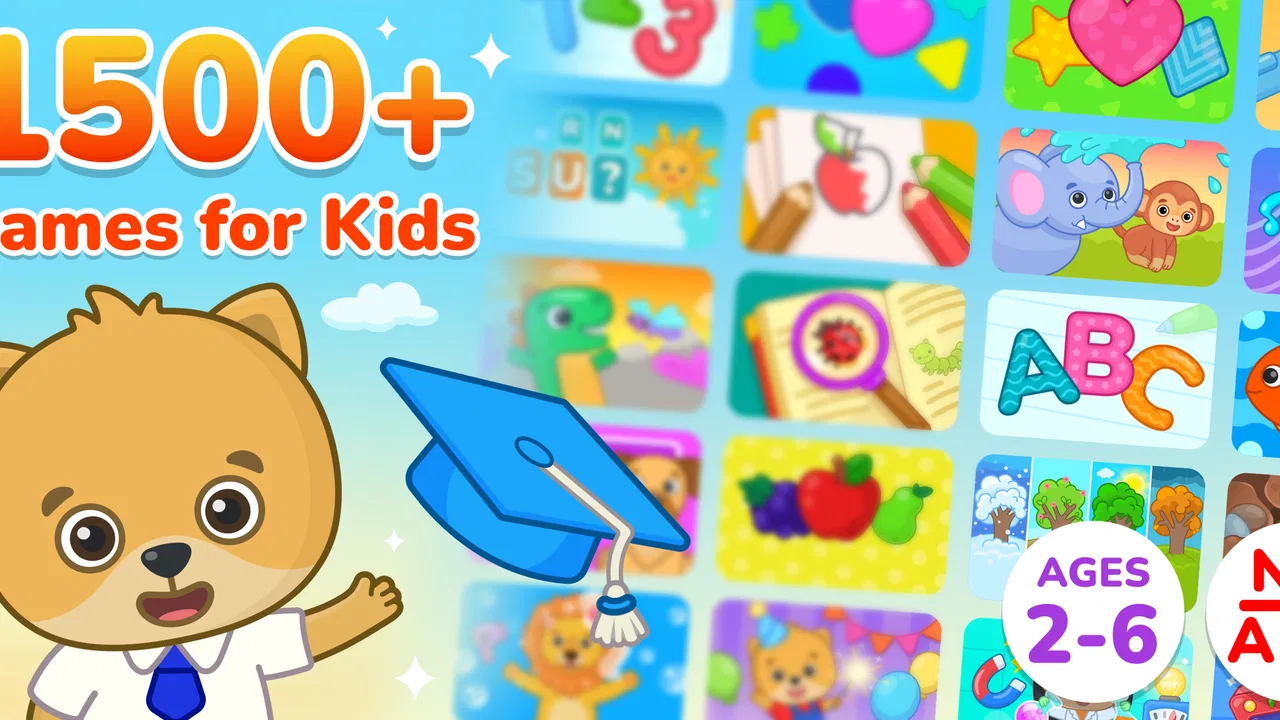
Kids Academy: Learning Games is an educational app designed for young children, generally focused on preschool and early elementary learning. It combines interactive lessons, games, tracing activities, puzzles, videos, and practice exercises covering subjects such as reading, phonics, writing, numbers, math, and basic science. The activities are presented in a colorful, child-friendly format intended to make learning feel more like play than traditional studying.
02What age group is Kids Academy: Learning Games suitable for?
The app is mainly suitable for preschoolers, kindergarten children, and young learners in the early elementary years. The exact difficulty can vary between activities, so some games may be appropriate for younger children while others require stronger reading, counting, or writing skills. Parents should explore the available lessons first and select activities according to the child’s age, school level, attention span, and individual learning needs.
03Does Kids Academy: Learning Games require a subscription or include in-app purchases?
Kids Academy: Learning Games may offer a mixture of free content and premium lessons, depending on the version, platform, region, and current promotion. Additional activities or learning programs can be locked behind a subscription or in-app purchase. Before starting a trial, parents should carefully check the price, billing frequency, renewal terms, and cancellation instructions shown in the app store to avoid unexpected charges.
04Can children use Kids Academy: Learning Games without an internet connection?
Offline availability may depend on the specific lessons and subscription plan. Some content can potentially be downloaded for use later, but the app may still require an internet connection for account access, synchronization, updates, advertisements, or newly added activities. If offline learning is important, parents should download the desired lessons while connected and test them in airplane mode before relying on the app during travel.
05Is Kids Academy: Learning Games safe and appropriate for children?
The app is built around children’s education and uses age-oriented activities, but parents should still review its privacy settings, account requirements, advertisements, and purchase options before handing over the device. Adult supervision is recommended, particularly during the first setup. Parents should also check whether the app collects usage information, requires a profile, or provides parental controls, since policies and features can change with updates.
Pros
- Covers reading
- math
- science
- and creative skills in one app.
- Short activities are suitable for young children’s limited attention spans.
- Progressive difficulty helps children advance at a comfortable pace.
- Bright visuals and friendly characters make lessons inviting.
- Useful for quiet
- independent practice at home or while traveling.
Cons
- Some lessons and features may require a paid subscription.
- Younger children may need help navigating menus and selecting activities.
- The large content library can make it difficult to find specific lessons.
- Repeated activities may feel less engaging for children who learn quickly.
- Performance and loading speed may vary on older phones or tablets.

Kids Academy: Learning Games
Gallery